


Page 295 - Manual_Polaris_RZR_ProXP-20-21
P. 295
PVT SYSTEM

                   DRIVE BELT
                   BELT REMOVAL                                          BELT INSPECTION

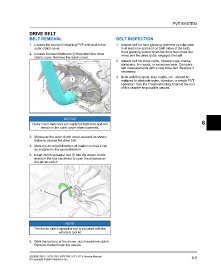
                   1. Loosen the clamp q retaining PVT inlet duct to the  1. Inspect belt for hour glassing (extreme circular wear
                      outer clutch cover.                                   in at least one spot and on both sides of the belt).
                                                                            Hour glassing occurs when the drive train does not
                   2. Loosen fourteen fasteners w that retain the outer     move and the drive clutch engages the belt.
                      clutch cover. Remove the clutch cover.
                                                                         2. Inspect belt for loose cords, missing cogs, cracks,
                                                                            abrasions, thin spots, or excessive wear. Compare
                                                                            belt measurements with a new drive belt. Replace if
                                                                            necessary.
                                                                         3. Belts with thin spots, burn marks, etc., should be
                                                                            replaced to eliminate noise, vibration, or erratic PVT
                                                                            operation. See the Troubleshooting Chart at the end
                                                                            of this chapter for possible causes.


                                         NOTICE
                                                                                                                              6
                     Outer cover fasteners are captured fasteners and will
                          remain in the outer cover when loosened.

                   3. Maneuver the outer clutch cover outward as shown
                      below to access the drive belt.
                   4. Mark the drive belt direction of rotation so that it can
                      be installed in the same direction.
                   5. Insert clutch spreader tool e into the driven clutch
                      and turn the tool clockwise to open the sheaves on
                      the driven clutch.


                                          NOTE
                      The driven clutch spreader tool is included with the
                                     vehicle’s tool kit


                   6. Walk the belt out of the driven clutch and drive clutch.
                      Remove the belt from the vehicle.


                   9930583 R01 - 2020-2021 RZR PRO XP / XP 4 Service Manual                                             6.5
                   © Copyright Polaris Industries Inc.

